18+
Moonlight Lake
 von Vealo
Du findest dieses Setup nicht in Vealo oder Steam? Steam blendet 18+ aus, bis Inhalte für Erwachsene in den Einstellungen erlaubt sind. Steam-Einstellungen öffnen
Was enthalten ist
Komplettes SetupLebendiger Hintergrund4KRotUhrBeleuchtung
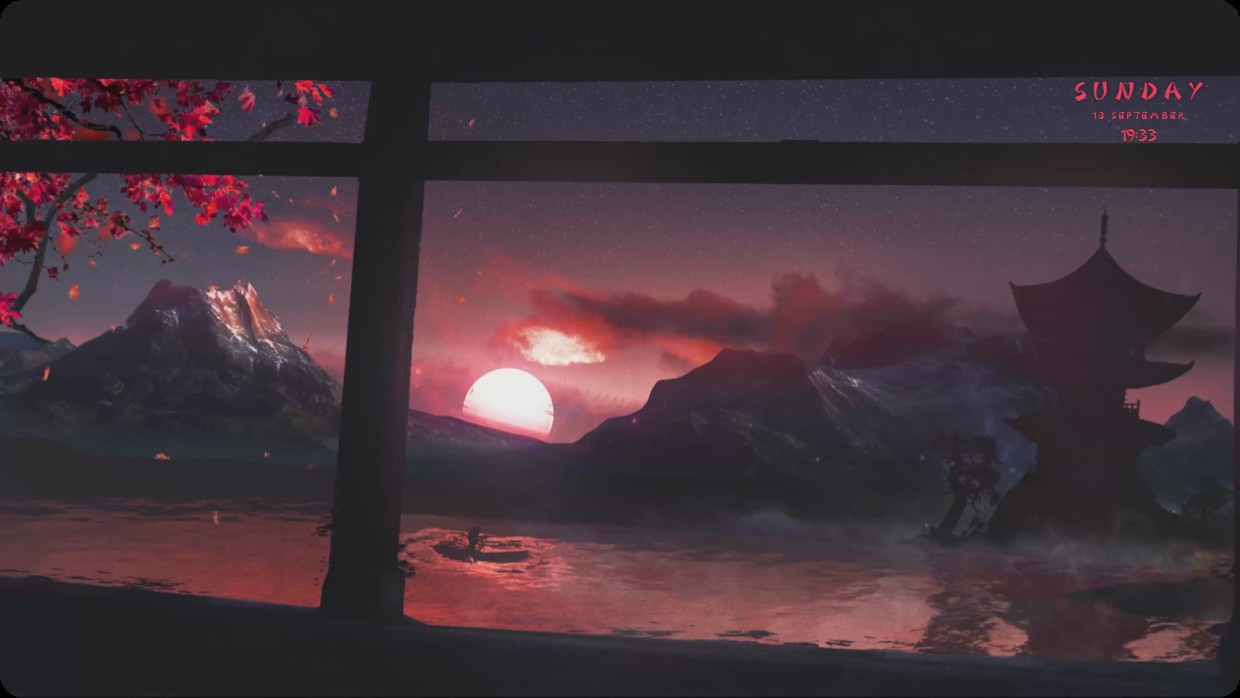
A mountain landscape at dusk viewed through a wooden frame. The sky is purple and red, reflecting on water. A pagoda stands on the right. Red maple leaves hang in the top left corner. Text in pink reads SUNDAY 13 SEPTEMBER 19:33 in the top right. The clock blends with the scene using a thin font and low opacity. This full desktop setup uses a live wallpaper at 4K resolution. It includes lighting and a clock widget. People who enjoy serene Japanese scenery will like it.
So installierst du dieses Setup
- Installiere Vealo aus Steam. Die kostenlose Version reicht.
- Klicke auf dieser Seite auf „In Steam abonnieren“ oder suche das Setup im Tab „Workshop“ in Vealo.
- Öffne Vealo, gehe ins Studio, Tab „Workshop“, „Meine Setups“, und klicke auf „Anwenden“. Hintergrund, Theme, Widgets, Cursor und Beleuchtung wechseln mit einem Klick. Deine Symbolgröße bleibt, wie du sie eingestellt hast.
Ähnliche Setups
Alle Setups
Dein Desktop, ein Klick
Kostenlos auf Steam. Nimm ein Setup oder bau dein eigenes, Pro nur, wenn du den Rest willst.
Windows 10 / 11