18+
Minecraft Cave
 von Vealo
Du findest dieses Setup nicht in Vealo oder Steam? Steam blendet 18+ aus, bis Inhalte für Erwachsene in den Einstellungen erlaubt sind. Steam-Einstellungen öffnen
Was enthalten ist
Widget-Anordnung2KViolettUhrPlayerKalenderWetterNotizenVisualizerEffekteBeleuchtung
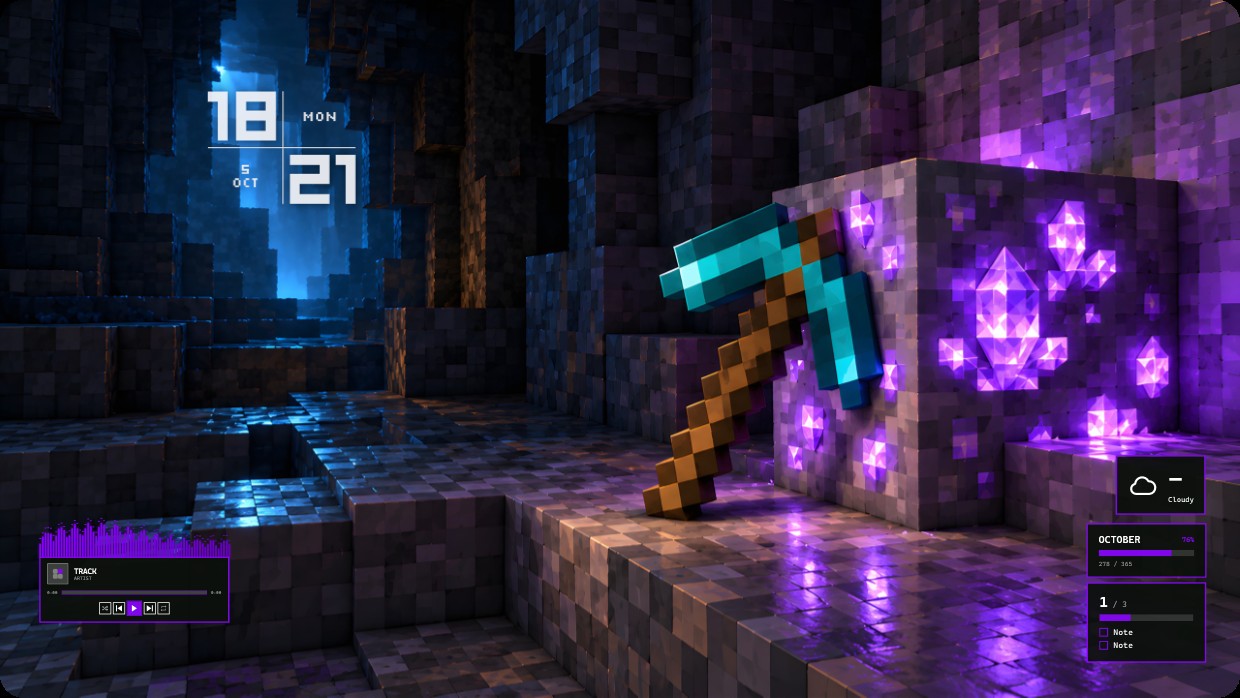
The wallpaper shows a diamond pickaxe leaning against a block of glowing purple crystals in a Minecraft cave. The scene is dark with blue and purple lighting, creating a cool and contrasty atmosphere. A clock and date are shown at the top left, while weather, calendar, player, notes, visualizer, effects, and lighting widgets sit on the right and bottom left. The font is thin white text with low transparency. This setup will suit fans of Minecraft.
So installierst du dieses Setup
- Installiere Vealo aus Steam. Die kostenlose Version reicht.
- Klicke auf dieser Seite auf „In Steam abonnieren“ oder suche das Setup im Tab „Workshop“ in Vealo.
- Öffne Vealo, gehe ins Studio, Tab „Workshop“, „Meine Setups“, und klicke auf „Anwenden“. Hintergrund, Theme, Widgets, Cursor und Beleuchtung wechseln mit einem Klick. Deine Symbolgröße bleibt, wie du sie eingestellt hast.
Ähnliche Setups
Alle Setups




Dein Desktop, ein Klick
Kostenlos auf Steam. Nimm ein Setup oder bau dein eigenes, Pro nur, wenn du den Rest willst.
Windows 10 / 11