18+
Neon City
 Vealo द्वारा
19
19
2
Vealo द्वारा
19
19
2
यह सेटअप Vealo या Steam में नहीं दिख रहा? जब तक सेटिंग्स में वयस्क कंटेंट की अनुमति न हो, Steam 18+ छिपाता है। Steam सेटिंग्स खोलें
अंदर क्या है
पूरा डेस्कटॉपलाइव वॉलपेपर4Kगुलाबीघड़ीइफ़ेक्ट्सलाइटिंगध्वनि
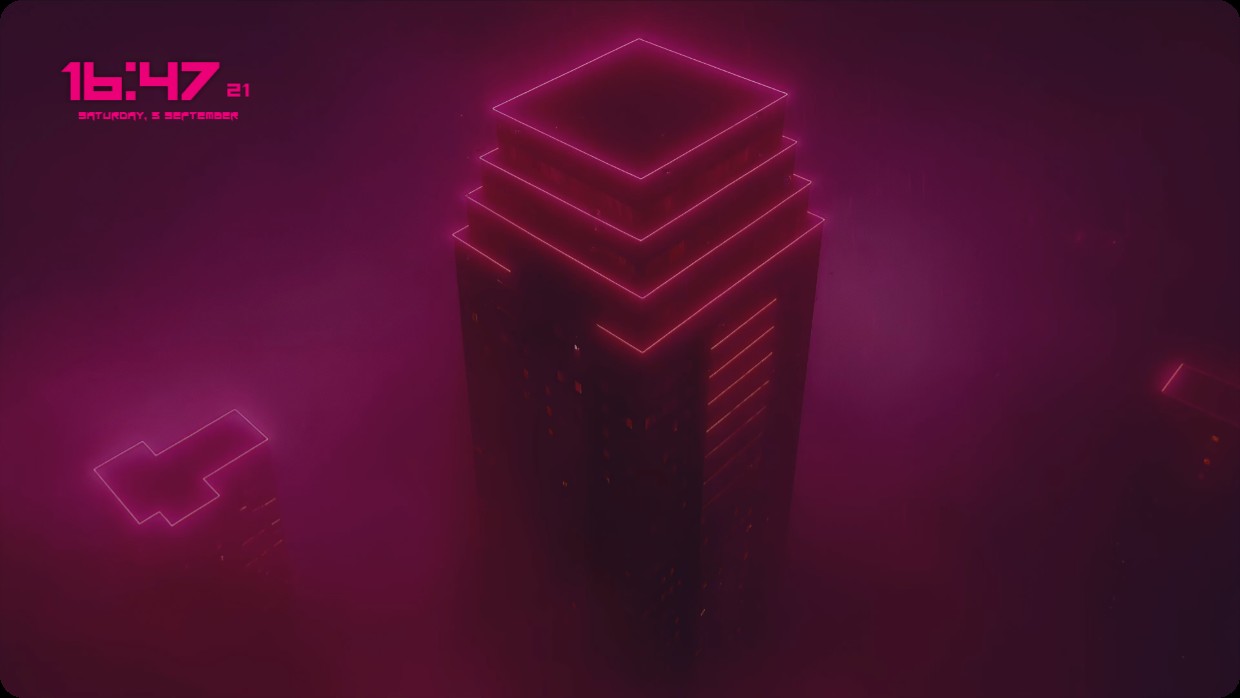
A skyscraper outlined in glowing pink neon dominates a foggy urban scene. The palette is dark with magenta and deep purple tones, lit by sharp, vibrant highlights. The mood feels futuristic and moody. A clock and date widget appear top left, using bold pink text on a semi-transparent background. This setup includes live wallpaper, 4K resolution, and full desktop integration. Fans of neon cityscapes will like it.
यह सेटअप कैसे इंस्टॉल करें
- Steam से Vealo इंस्टॉल करें। मुफ़्त वर्ज़न काफ़ी है।
- इस पेज पर «Steam में सब्सक्राइब करें» दबाएँ, या Vealo के अंदर «Workshop» टैब में यह सेटअप ढूँढें।
- Vealo खोलें, Studio में जाएँ, «Workshop» टैब, «मेरे सेटअप», और «लागू करें» दबाएँ। वॉलपेपर, थीम, विजेट, कर्सर और लाइटिंग एक क्लिक में बदल जाते हैं। आइकन का साइज़ आपका ही रहता है।
मिलते-जुलते सेटअप
सभी सेटअप
एक क्लिक में साफ़ डेस्कटॉप
कुछ भी खरीदने से पहले अपने कंप्यूटर पर आज़माएँ।
Windows 10 / 11