18+
так
 _Yuvelir_ द्वारा
3
7
0
_Yuvelir_ द्वारा
3
7
0
यह सेटअप Vealo या Steam में नहीं दिख रहा? जब तक सेटिंग्स में वयस्क कंटेंट की अनुमति न हो, Steam 18+ छिपाता है। Steam सेटिंग्स खोलें
अंदर क्या है
पूरा डेस्कटॉप4Kलालघड़ीप्लेयरसिस्टमकैलेंडरमौसमनोट्सविज़ुअलाइज़रइफ़ेक्ट्सलाइटिंग
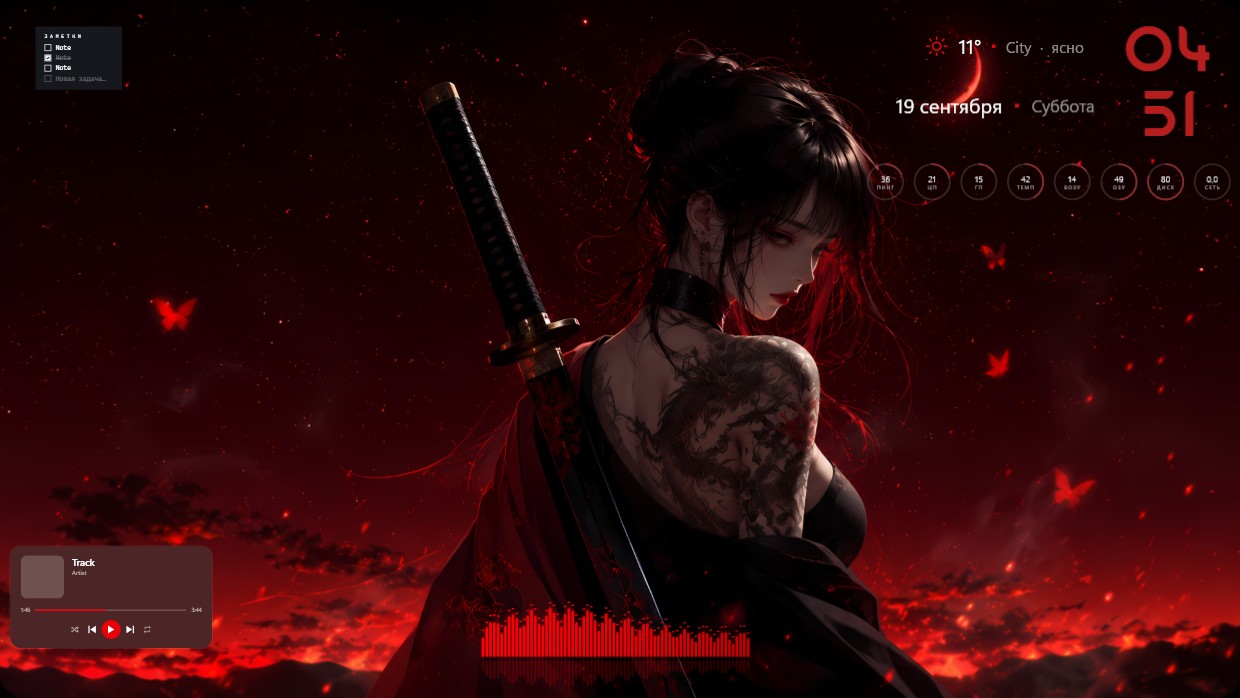
A woman with dark hair and a dragon tattoo on her shoulder holds a katana against a red sky. The scene is dominated by deep reds, blacks, and glowing orange accents. It feels intense and dramatic. Widgets include a clock in large red numerals top right, weather and date details nearby, a player bar at bottom left with a visualizer below it, and a notes panel upper left. This full 4K desktop setup from Vealo’s Steam Workshop blends seamlessly into the image. Fans of dark fantasy aesthetics will like this.
यह सेटअप कैसे इंस्टॉल करें
- Steam से Vealo इंस्टॉल करें। मुफ़्त वर्ज़न काफ़ी है।
- इस पेज पर «Steam में सब्सक्राइब करें» दबाएँ, या Vealo के अंदर «Workshop» टैब में यह सेटअप ढूँढें।
- Vealo खोलें, Studio में जाएँ, «Workshop» टैब, «मेरे सेटअप», और «लागू करें» दबाएँ। वॉलपेपर, थीम, विजेट, कर्सर और लाइटिंग एक क्लिक में बदल जाते हैं। आइकन का साइज़ आपका ही रहता है।
मिलते-जुलते सेटअप
सभी सेटअप
 Vealo
Vealo


एक क्लिक में साफ़ डेस्कटॉप
कुछ भी खरीदने से पहले अपने कंप्यूटर पर आज़माएँ।
Windows 10 / 11