18+
Anime Pink Chill
 Vealo द्वारा
6
10
0
Vealo द्वारा
6
10
0
यह सेटअप Vealo या Steam में नहीं दिख रहा? जब तक सेटिंग्स में वयस्क कंटेंट की अनुमति न हो, Steam 18+ छिपाता है। Steam सेटिंग्स खोलें
अंदर क्या है
विजेट लेआउट2Kलालघड़ीप्लेयरसिस्टमकैलेंडरनोट्सइफ़ेक्ट्सलाइटिंग
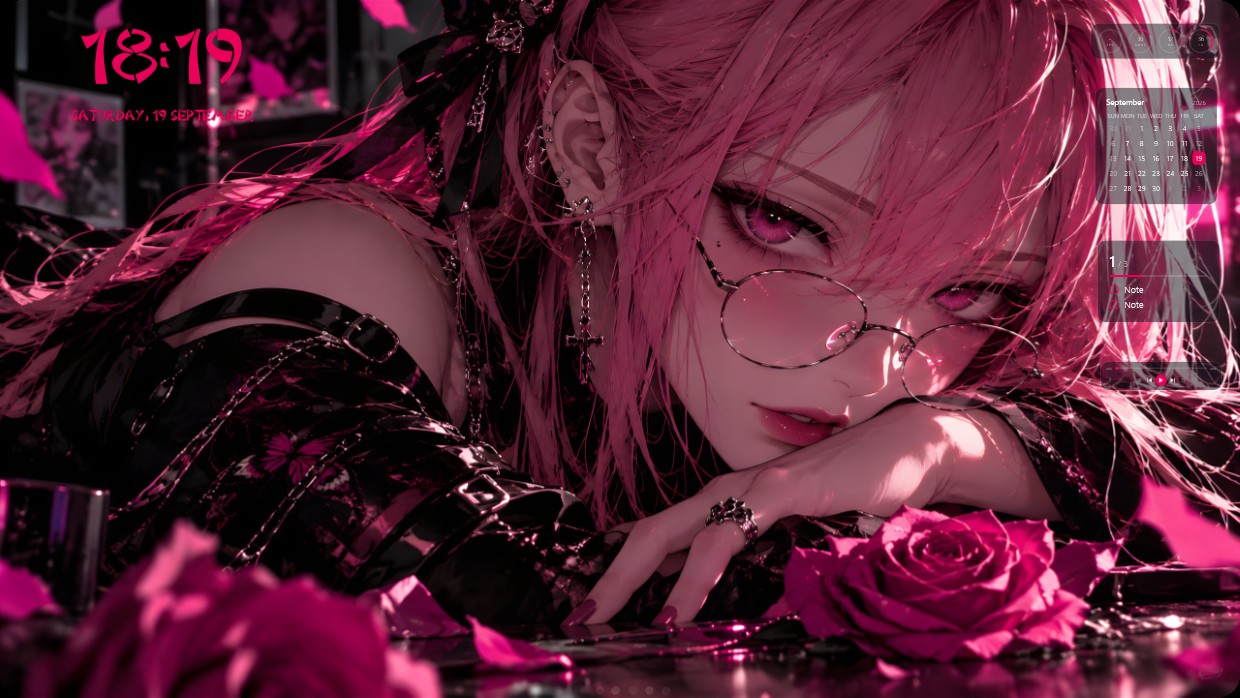
A pink-haired anime girl in glasses rests her head on her hand near a rose. The scene is saturated in magenta and black with soft lighting. Widgets include a clock, player, calendar, notes, system meters, effects, and lighting. They sit in the top right corner with white text and semi-transparent backgrounds blending into the image. This setup suits fans of stylized anime aesthetics.
यह सेटअप कैसे इंस्टॉल करें
- Steam से Vealo इंस्टॉल करें। मुफ़्त वर्ज़न काफ़ी है।
- इस पेज पर «Steam में सब्सक्राइब करें» दबाएँ, या Vealo के अंदर «Workshop» टैब में यह सेटअप ढूँढें।
- Vealo खोलें, Studio में जाएँ, «Workshop» टैब, «मेरे सेटअप», और «लागू करें» दबाएँ। वॉलपेपर, थीम, विजेट, कर्सर और लाइटिंग एक क्लिक में बदल जाते हैं। आइकन का साइज़ आपका ही रहता है।
मिलते-जुलते सेटअप
सभी सेटअप
एक क्लिक में साफ़ डेस्कटॉप
कुछ भी खरीदने से पहले अपने कंप्यूटर पर आज़माएँ।
Windows 10 / 11