18+
Overcast Metropolis
 Vealo द्वारा
4
1
0
Vealo द्वारा
4
1
0
यह सेटअप Vealo या Steam में नहीं दिख रहा? जब तक सेटिंग्स में वयस्क कंटेंट की अनुमति न हो, Steam 18+ छिपाता है। Steam सेटिंग्स खोलें
अंदर क्या है
विजेट लेआउट2Kएकरंगीघड़ीइफ़ेक्ट्सलाइटिंग
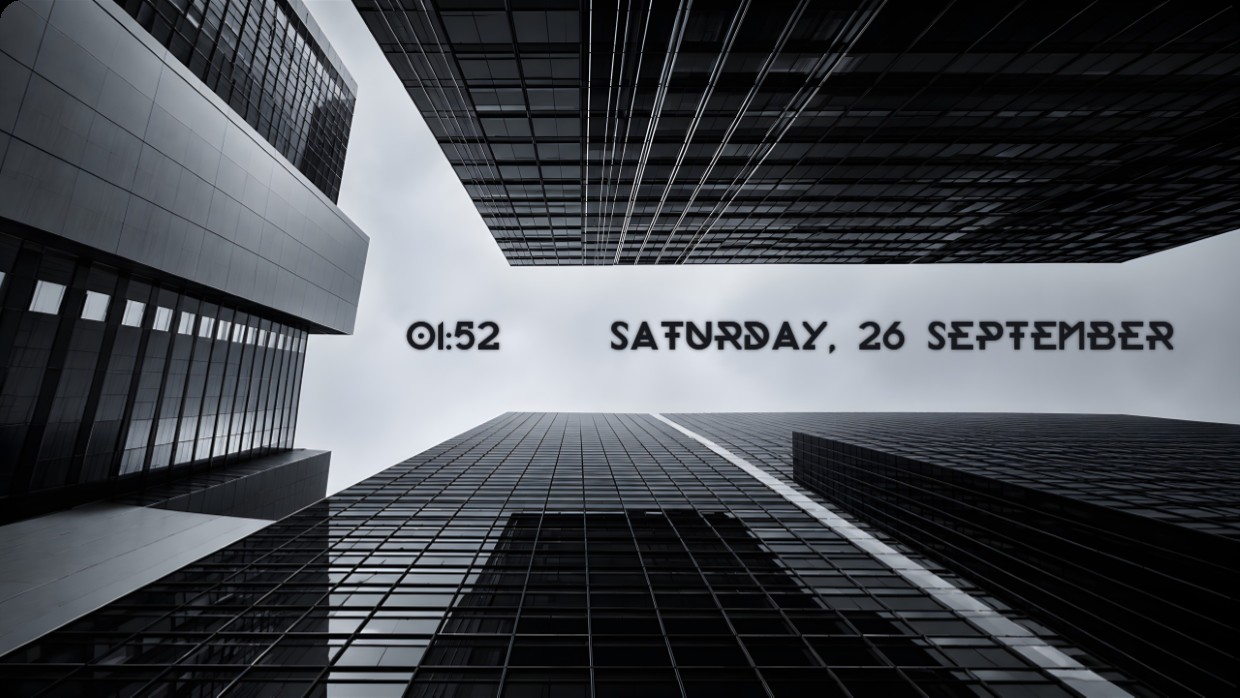
The wallpaper shows a low angle view of modern glass skyscrapers under an overcast sky. The scene is monochrome dominated by black and grey tones with soft lighting. The mood is calm and minimalist. A clock and date widget sit centered in the middle ground, using bold sans serif text in dark grey that blends subtly into the background. This 2K setup includes effects and lighting inside Vealo and is available from the Steam Workshop. People who prefer clean urban aesthetics will like it.
यह सेटअप कैसे इंस्टॉल करें
- Steam से Vealo इंस्टॉल करें। मुफ़्त वर्ज़न काफ़ी है।
- इस पेज पर «Steam में सब्सक्राइब करें» दबाएँ, या Vealo के अंदर «Workshop» टैब में यह सेटअप ढूँढें।
- Vealo खोलें, Studio में जाएँ, «Workshop» टैब, «मेरे सेटअप», और «लागू करें» दबाएँ। वॉलपेपर, थीम, विजेट, कर्सर और लाइटिंग एक क्लिक में बदल जाते हैं। आइकन का साइज़ आपका ही रहता है।
मिलते-जुलते सेटअप
सभी सेटअप


एक क्लिक में साफ़ डेस्कटॉप
कुछ भी खरीदने से पहले अपने कंप्यूटर पर आज़माएँ।
Windows 10 / 11