18+
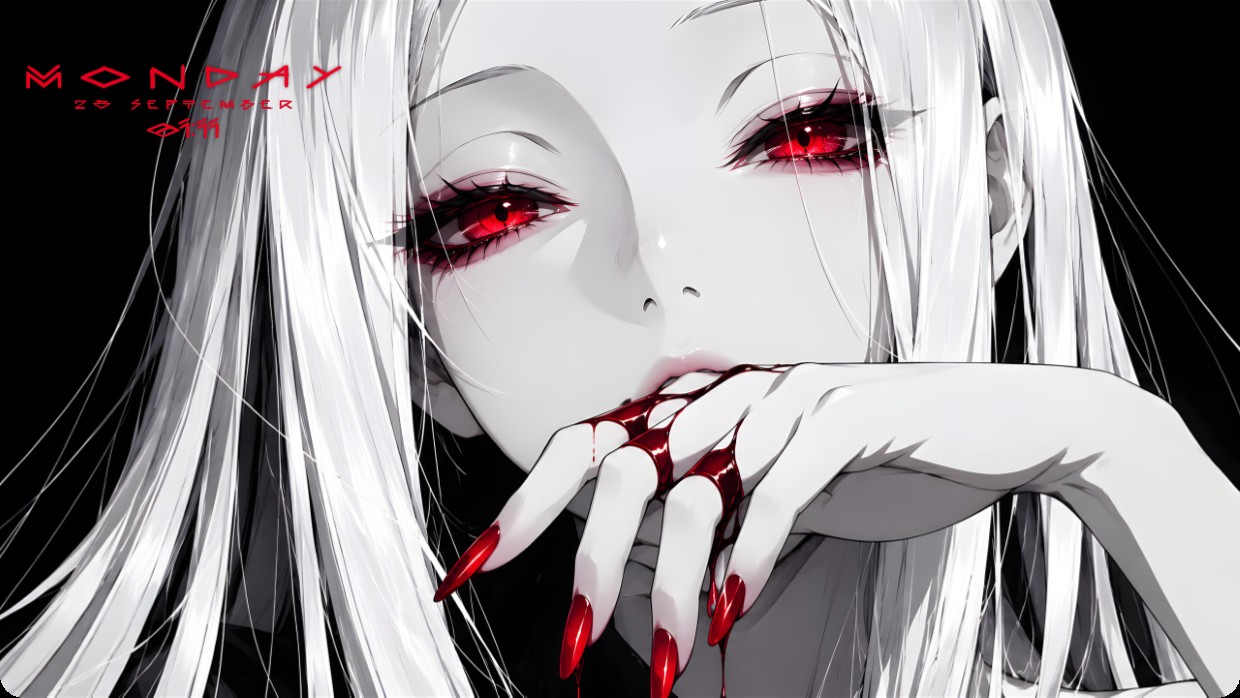
Red Eyes Anime White
 od Vealo
2
1
0
od Vealo
2
1
0
Nie widzisz tego setupu w Vealo lub Steam? Steam ukrywa 18+, dopóki w ustawieniach nie zezwolisz na treści dla dorosłych. Otwórz ustawienia Steam
Co zawiera
Układ widżetów2KMonochromatycznyZegarEfektyPodświetlenie
The wallpaper shows an anime-style character with white hair and red eyes holding bloodied fingers to her lips. The scene is dark with black background, stark white skin tones, and vivid red accents from the eyes and nails. It feels tense and dramatic. Widgets include a clock in the top left corner with thin white text on semi-transparent black overlay. The setup uses 2K resolution and includes effects and lighting inside Vealo. Fans of gothic anime aesthetics will like it.
Jak zainstalować ten setup
- Zainstaluj Vealo ze Steam. Wersja darmowa wystarczy.
- Kliknij „Subskrybuj w Steam” na tej stronie albo znajdź setup w zakładce „Workshop” w Vealo.
- Otwórz Vealo, wejdź do Studia, zakładka „Workshop”, „Moje setupy”, i kliknij „Zastosuj”. Tapeta, motyw, widżety, kursor i podświetlenie zmienią się jednym kliknięciem. Rozmiar ikon zostanie taki, jaki ustawiłeś.
Podobne setupy
Wszystkie setupy
Czysty pulpit jednym kliknięciem
Sprawdź ją na swoim komputerze przed zakupem.
Windows 10 / 11