18+
Pink Anime Girl
 by Vealo
70
24
2
by Vealo
70
24
2
Can't find this setup in Vealo or Steam? Steam hides 18+ until adult content is allowed in your settings. Open Steam settings
What is inside
Full desktopLive wallpaper4KRedClockPlayerSystemCalendarWeatherVisualizerLighting
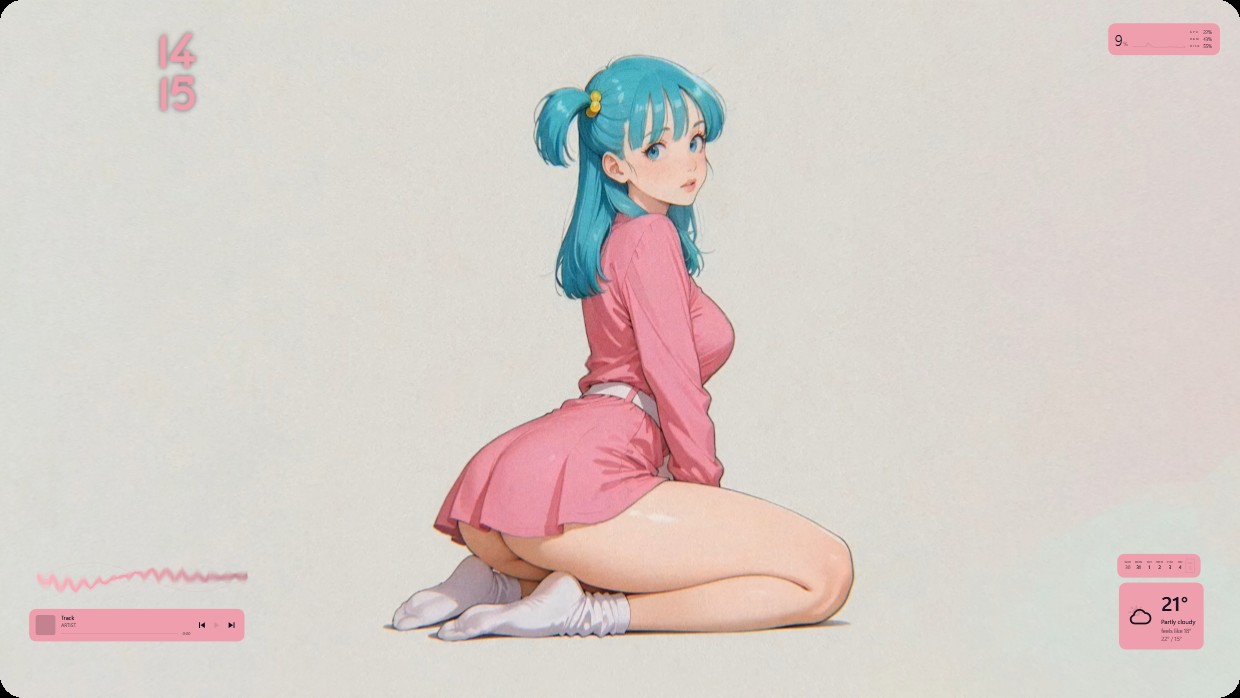
A girl with blue hair in twin tails kneels against a plain background. The scene uses soft pink and light beige tones, lit warmly. It feels calm and gentle. Widgets include a clock at top left, weather and calendar at bottom right, player and system meters at bottom left. All widgets have transparent pink text. This is a full desktop with live wallpaper in 4K. People who like anime style will appreciate it.
How to install this setup
- Install Vealo from Steam. The free version is enough.
- Press Subscribe in Steam on this page, or find this setup in the Workshop tab inside Vealo.
- Open Vealo, go to Studio, then Workshop, then My setups, and press Apply. Wallpaper, theme, widgets, cursor and lighting change in one click. Your icon size stays as you set it.
Similar setups
All setups

A clean desktop in one click
Try it on your own machine before you buy anything.
Windows 10 / 11