18+
Lavender Lemonade
 von Vealo
Du findest dieses Setup nicht in Vealo oder Steam? Steam blendet 18+ aus, bis Inhalte für Erwachsene in den Einstellungen erlaubt sind. Steam-Einstellungen öffnen
Was enthalten ist
Widget-Anordnung2KMonochromUhrPlayerKalenderWetterNotizenVisualizerBeleuchtung
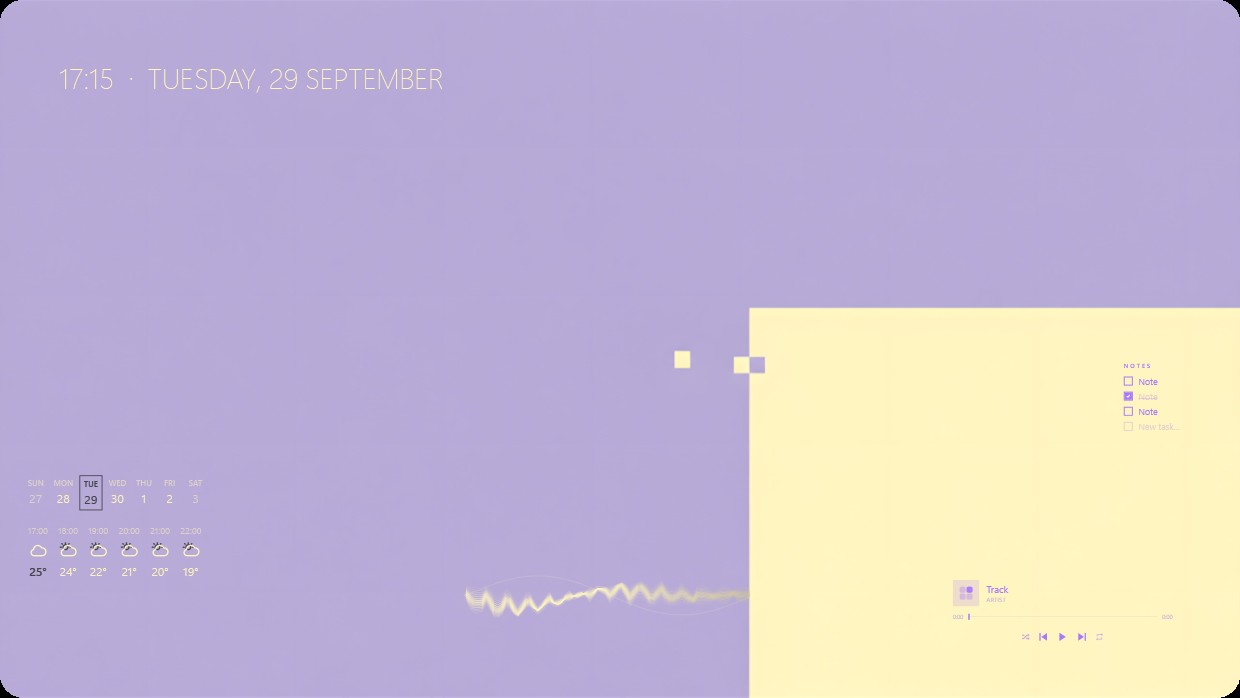
The wallpaper is a solid lavender gradient. The scene is soft and calm. A clock and date appear in the top left corner in pale yellow text. A calendar and weather widget are below it on the left side with matching pale yellow text. On the right, a bright yellow panel holds a music player and notes widget. All widgets use thin sans-serif fonts and light transparency to blend into the background. This setup is ideal for someone who prefers minimalist aesthetics.
So installierst du dieses Setup
- Installiere Vealo aus Steam. Die kostenlose Version reicht.
- Klicke auf dieser Seite auf „In Steam abonnieren“ oder suche das Setup im Tab „Workshop“ in Vealo.
- Öffne Vealo, gehe ins Studio, Tab „Workshop“, „Meine Setups“, und klicke auf „Anwenden“. Hintergrund, Theme, Widgets, Cursor und Beleuchtung wechseln mit einem Klick. Deine Symbolgröße bleibt, wie du sie eingestellt hast.
Ähnliche Setups
Alle Setups




Dein Desktop, ein Klick
Kostenlos auf Steam. Nimm ein Setup oder bau dein eigenes, Pro nur, wenn du den Rest willst.
Windows 10 / 11