18+
Gojos Blue
 Vealo द्वारा
6
6
0
Vealo द्वारा
6
6
0
यह सेटअप Vealo या Steam में नहीं दिख रहा? जब तक सेटिंग्स में वयस्क कंटेंट की अनुमति न हो, Steam 18+ छिपाता है। Steam सेटिंग्स खोलें
अंदर क्या है
पूरा डेस्कटॉपलाइव वॉलपेपर4Kनीलाघड़ीप्लेयरविज़ुअलाइज़रलाइटिंग
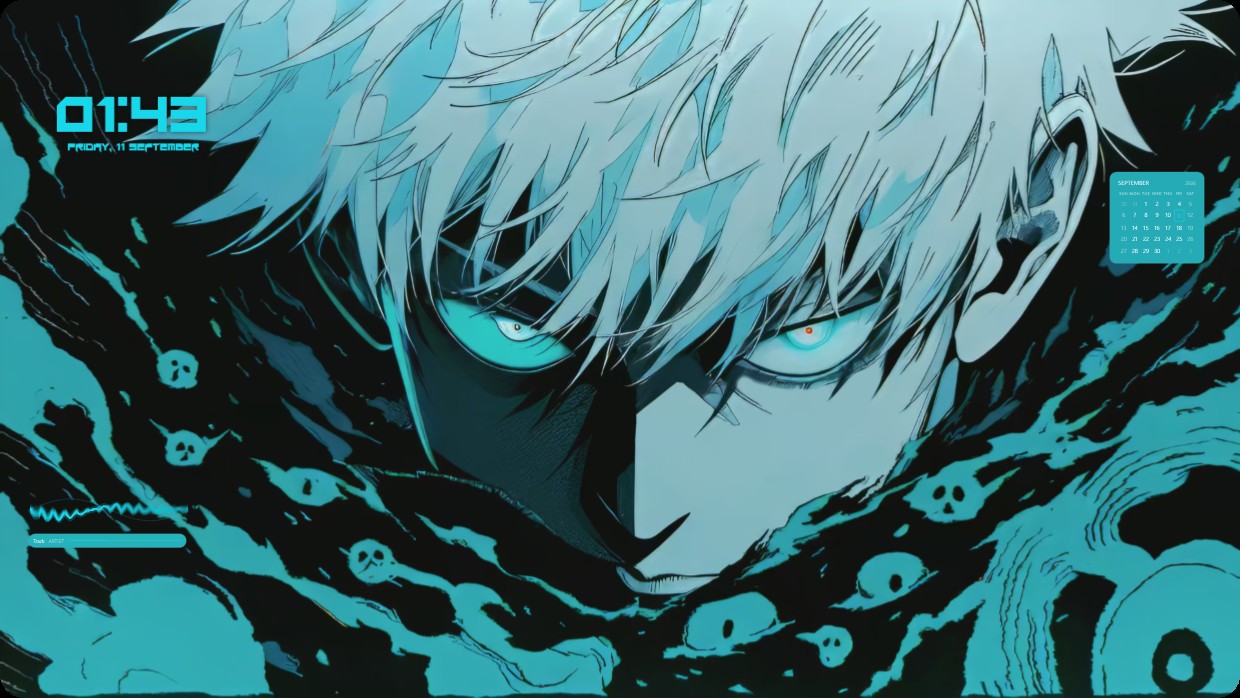
This setup features a close-up of an anime character with white hair and glowing blue eyes surrounded by dark teal liquid and skulls. The scene is dark and cool, dominated by shades of black, teal, and light blue. A clock shows the time in bold cyan text at top left. A calendar appears as a small translucent box at top right. A player bar sits at bottom left with matching teal color. It is a full desktop with live wallpaper and 4K resolution. Fans of anime will like it.
यह सेटअप कैसे इंस्टॉल करें
- Steam से Vealo इंस्टॉल करें। मुफ़्त वर्ज़न काफ़ी है।
- इस पेज पर «Steam में सब्सक्राइब करें» दबाएँ, या Vealo के अंदर «Workshop» टैब में यह सेटअप ढूँढें।
- Vealo खोलें, Studio में जाएँ, «Workshop» टैब, «मेरे सेटअप», और «लागू करें» दबाएँ। वॉलपेपर, थीम, विजेट, कर्सर और लाइटिंग एक क्लिक में बदल जाते हैं। आइकन का साइज़ आपका ही रहता है।
मिलते-जुलते सेटअप
सभी सेटअप
एक क्लिक में साफ़ डेस्कटॉप
कुछ भी खरीदने से पहले अपने कंप्यूटर पर आज़माएँ।
Windows 10 / 11