18+
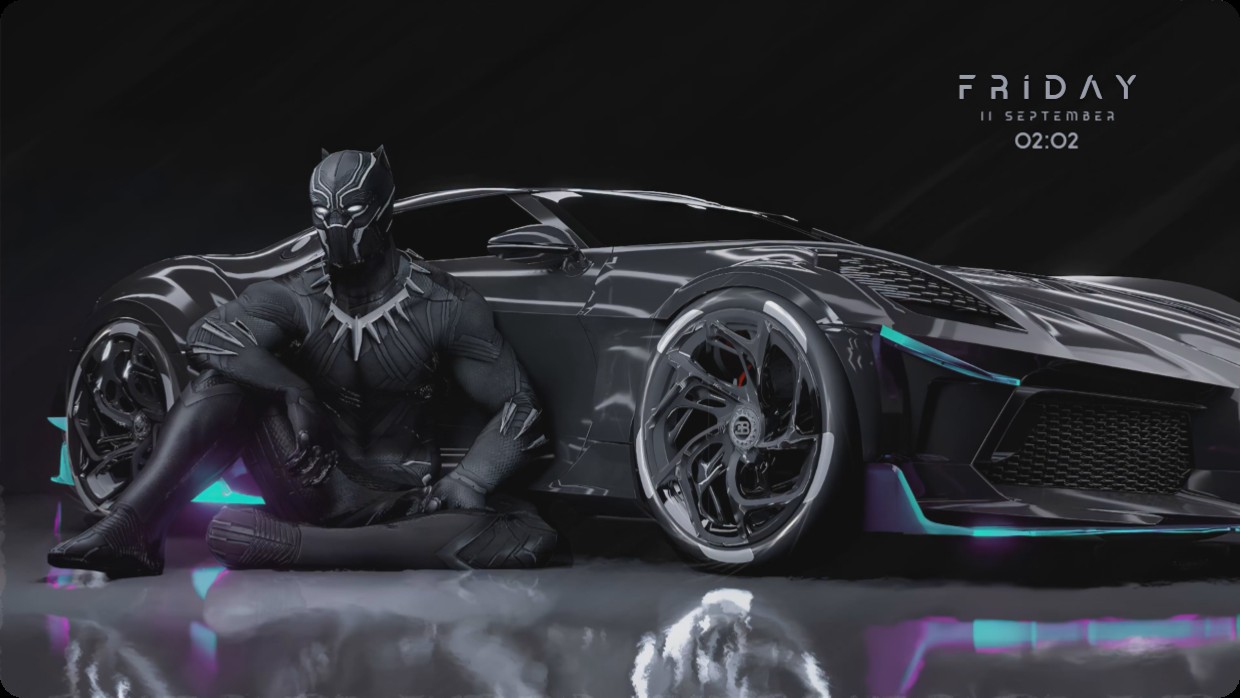
Black Panther
 Vealo द्वारा
2
7
0
Vealo द्वारा
2
7
0
यह सेटअप Vealo या Steam में नहीं दिख रहा? जब तक सेटिंग्स में वयस्क कंटेंट की अनुमति न हो, Steam 18+ छिपाता है। Steam सेटिंग्स खोलें
अंदर क्या है
पूरा डेस्कटॉपलाइव वॉलपेपर4Kनीलाघड़ीलाइटिंग
The wallpaper shows Black Panther sitting beside a sleek black sports car. The scene is dark, dominated by blacks and metallic greys, accented with glowing cyan and purple lighting under the vehicle. The mood is cool and cinematic. A clock widget in the top right corner displays date and time in thin white text. This setup features a full desktop with live wallpaper and 4K resolution. Fans of Black Panther will like it.
यह सेटअप कैसे इंस्टॉल करें
- Steam से Vealo इंस्टॉल करें। मुफ़्त वर्ज़न काफ़ी है।
- इस पेज पर «Steam में सब्सक्राइब करें» दबाएँ, या Vealo के अंदर «Workshop» टैब में यह सेटअप ढूँढें।
- Vealo खोलें, Studio में जाएँ, «Workshop» टैब, «मेरे सेटअप», और «लागू करें» दबाएँ। वॉलपेपर, थीम, विजेट, कर्सर और लाइटिंग एक क्लिक में बदल जाते हैं। आइकन का साइज़ आपका ही रहता है।
मिलते-जुलते सेटअप
सभी सेटअप


 _Yuvelir_

एक क्लिक में साफ़ डेस्कटॉप
कुछ भी खरीदने से पहले अपने कंप्यूटर पर आज़माएँ।
Windows 10 / 11