18+
Winter Forest
 Vealo द्वारा
10
15
1
Vealo द्वारा
10
15
1
यह सेटअप Vealo या Steam में नहीं दिख रहा? जब तक सेटिंग्स में वयस्क कंटेंट की अनुमति न हो, Steam 18+ छिपाता है। Steam सेटिंग्स खोलें
अंदर क्या है
पूरा डेस्कटॉपलाइव वॉलपेपर4Kपीलाघड़ीप्लेयरसिस्टमकैलेंडरनोट्सलाइटिंग
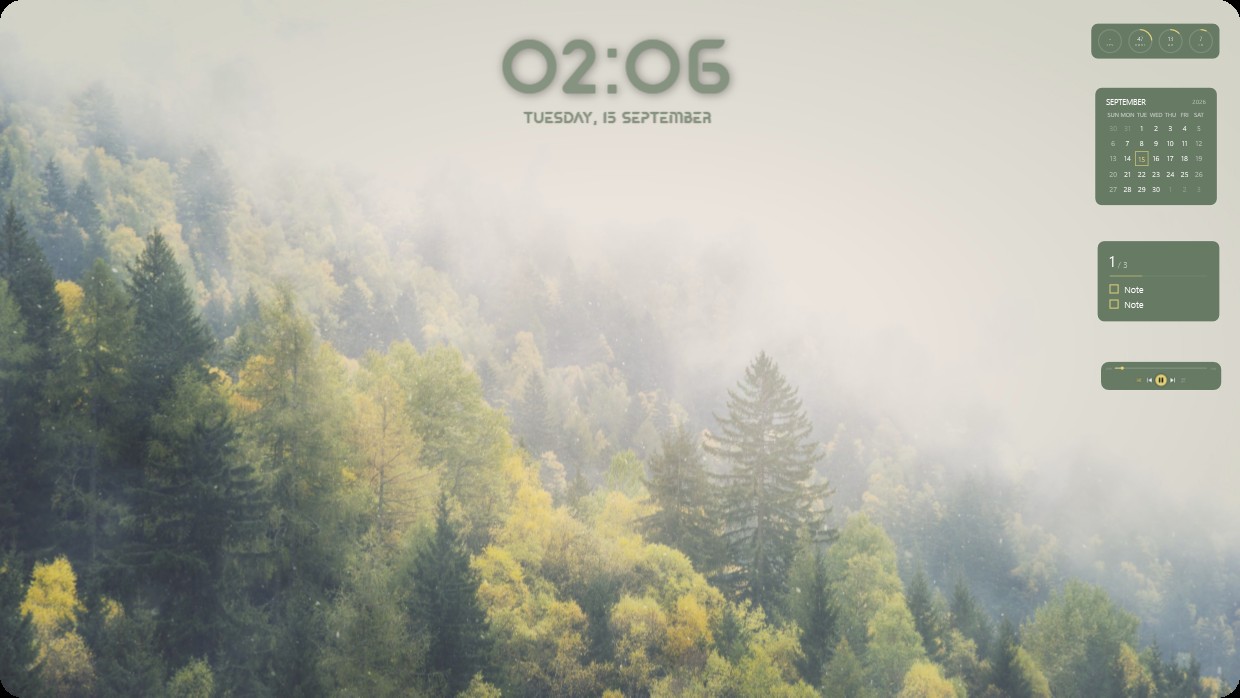
A misty forest with green and yellow trees under soft light. The scene is calm and bright with muted greens and yellows. A large clock shows 02:06 centered at the top. On the right, a calendar, notes panel, player bar, and system meters appear in matching olive tones with semi-transparent backgrounds. This full desktop setup uses a live wallpaper at 4K resolution. People who enjoy quiet natural scenes will like it.
यह सेटअप कैसे इंस्टॉल करें
- Steam से Vealo इंस्टॉल करें। मुफ़्त वर्ज़न काफ़ी है।
- इस पेज पर «Steam में सब्सक्राइब करें» दबाएँ, या Vealo के अंदर «Workshop» टैब में यह सेटअप ढूँढें।
- Vealo खोलें, Studio में जाएँ, «Workshop» टैब, «मेरे सेटअप», और «लागू करें» दबाएँ। वॉलपेपर, थीम, विजेट, कर्सर और लाइटिंग एक क्लिक में बदल जाते हैं। आइकन का साइज़ आपका ही रहता है।
मिलते-जुलते सेटअप
सभी सेटअप

एक क्लिक में साफ़ डेस्कटॉप
कुछ भी खरीदने से पहले अपने कंप्यूटर पर आज़माएँ।
Windows 10 / 11