18+
Йоу
 Kiryass द्वारा
3
10
0
Kiryass द्वारा
3
10
0
यह सेटअप Vealo या Steam में नहीं दिख रहा? जब तक सेटिंग्स में वयस्क कंटेंट की अनुमति न हो, Steam 18+ छिपाता है। Steam सेटिंग्स खोलें
अंदर क्या है
पूरा डेस्कटॉप4Kनारंगीघड़ीप्लेयरइफ़ेक्ट्सलाइटिंग
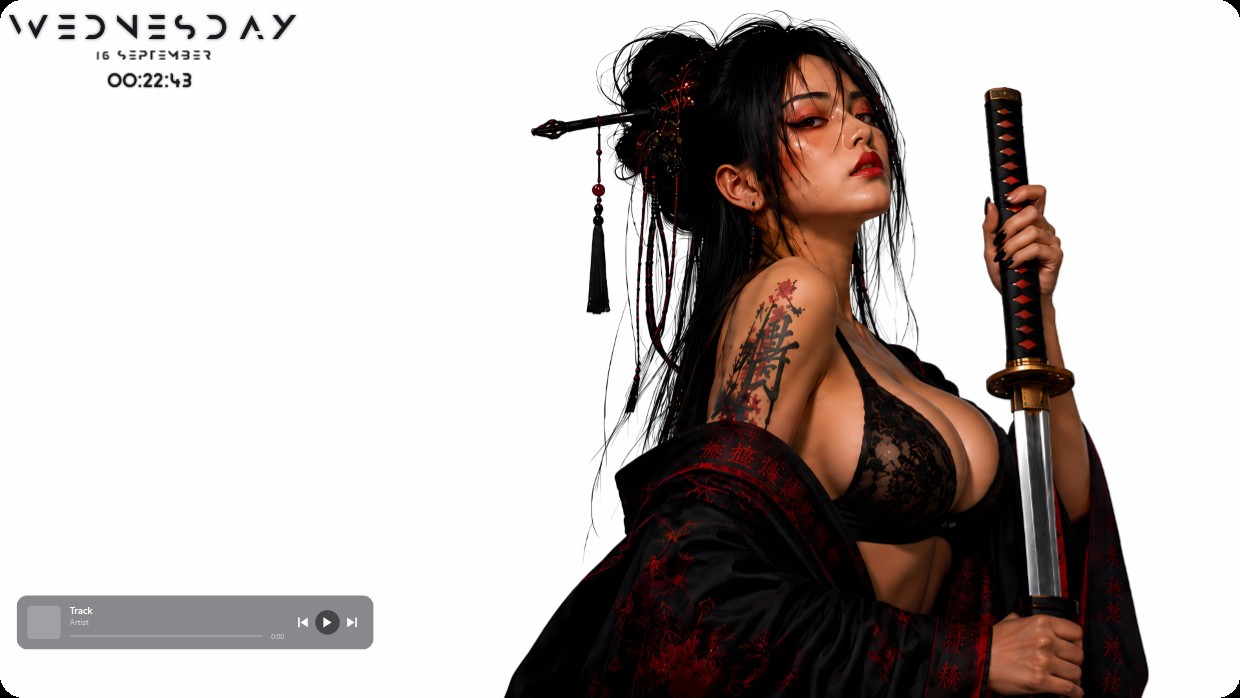
A woman in black lace holds a katana against a stark white background. Her dark hair is styled high, adorned with red tassels. Red floral tattoos mark her shoulder. The setup uses black and red as main colors with bright lighting. Widgets include a clock and player bar at the top left and bottom left. Fonts are thin and grey, blending subtly into the scene. This full desktop in 4K is ideal for fans of bold anime-inspired aesthetics.
यह सेटअप कैसे इंस्टॉल करें
- Steam से Vealo इंस्टॉल करें। मुफ़्त वर्ज़न काफ़ी है।
- इस पेज पर «Steam में सब्सक्राइब करें» दबाएँ, या Vealo के अंदर «Workshop» टैब में यह सेटअप ढूँढें।
- Vealo खोलें, Studio में जाएँ, «Workshop» टैब, «मेरे सेटअप», और «लागू करें» दबाएँ। वॉलपेपर, थीम, विजेट, कर्सर और लाइटिंग एक क्लिक में बदल जाते हैं। आइकन का साइज़ आपका ही रहता है।
मिलते-जुलते सेटअप
सभी सेटअप
 Vealo
Vealo

 _Yuvelir_

एक क्लिक में साफ़ डेस्कटॉप
कुछ भी खरीदने से पहले अपने कंप्यूटर पर आज़माएँ।
Windows 10 / 11