18+
Pale King
 Vealo द्वारा
2
1
0
Vealo द्वारा
2
1
0
यह सेटअप Vealo या Steam में नहीं दिख रहा? जब तक सेटिंग्स में वयस्क कंटेंट की अनुमति न हो, Steam 18+ छिपाता है। Steam सेटिंग्स खोलें
अंदर क्या है
विजेट लेआउट2Kनीलाघड़ीप्लेयरकैलेंडरनोट्सविज़ुअलाइज़रइफ़ेक्ट्सलाइटिंग
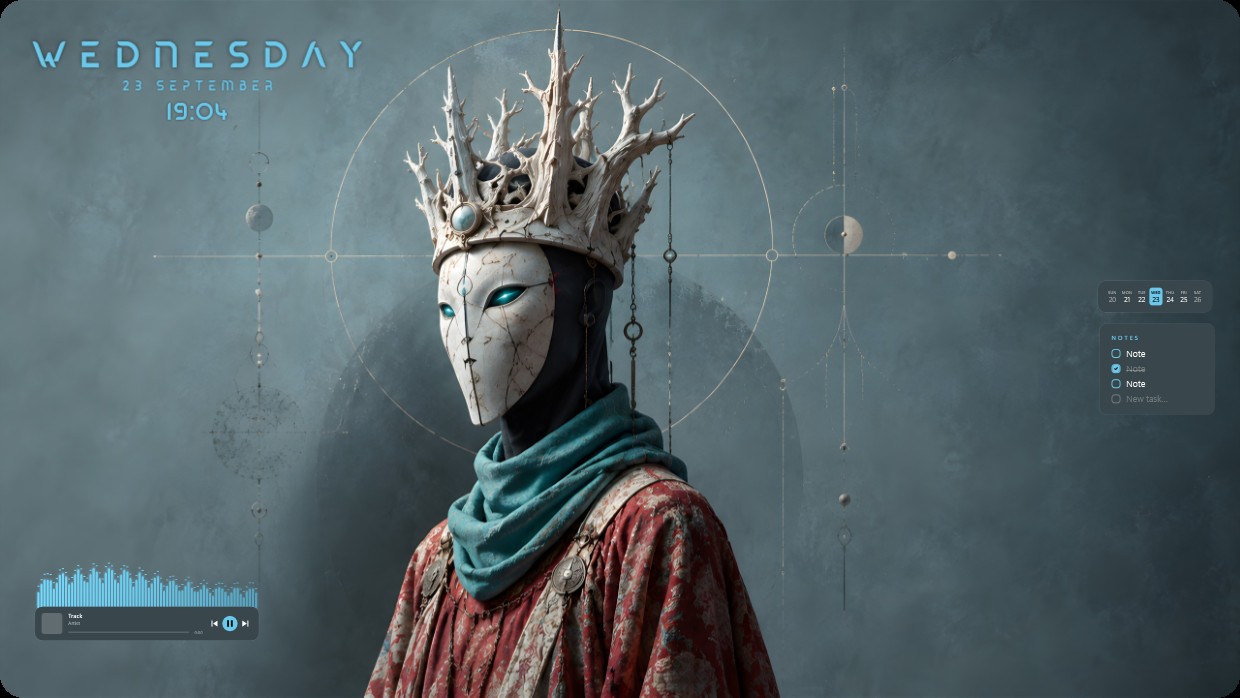
The wallpaper shows a masked figure wearing a crown of bone-like spikes and a teal scarf. The scene is dark and cool, dominated by blue grey tones with accents of red and teal. The mood is solemn and mysterious. Widgets include a clock and date in the top left, a music player at bottom left, and notes on the right side. All widgets use thin white fonts with low transparency to blend into the background. This 2K setup includes visualizer effects and lighting. People who appreciate gothic aesthetics will like it.
यह सेटअप कैसे इंस्टॉल करें
- Steam से Vealo इंस्टॉल करें। मुफ़्त वर्ज़न काफ़ी है।
- इस पेज पर «Steam में सब्सक्राइब करें» दबाएँ, या Vealo के अंदर «Workshop» टैब में यह सेटअप ढूँढें।
- Vealo खोलें, Studio में जाएँ, «Workshop» टैब, «मेरे सेटअप», और «लागू करें» दबाएँ। वॉलपेपर, थीम, विजेट, कर्सर और लाइटिंग एक क्लिक में बदल जाते हैं। आइकन का साइज़ आपका ही रहता है।
मिलते-जुलते सेटअप
सभी सेटअप


एक क्लिक में साफ़ डेस्कटॉप
कुछ भी खरीदने से पहले अपने कंप्यूटर पर आज़माएँ।
Windows 10 / 11