18+
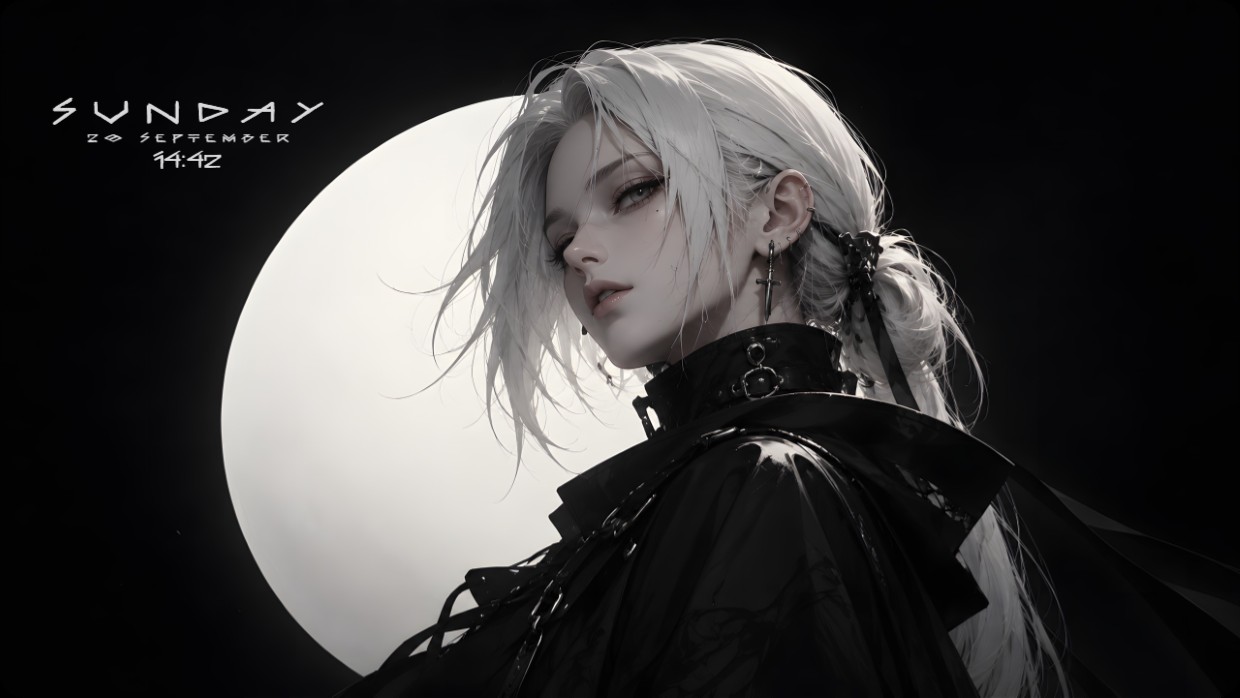
Black/White Anime Moon
 by Vealo
4
5
1
by Vealo
4
5
1
Can't find this setup in Vealo or Steam? Steam hides 18+ until adult content is allowed in your settings. Open Steam settings
What is inside
Widget layout2KMonochromeClockEffectsLighting
A character with white hair and dark clothing stands before a large moon. The scene is dark, dominated by black and white, with soft lighting on the figure. The mood is calm and mysterious. Widgets show date, time, and day in thin white text at the top left. This setup uses 2K resolution and includes effects and lighting inside Vealo. Fans of moody aesthetics will like it.
How to install this setup
- Install Vealo from Steam. The free version is enough.
- Press Subscribe in Steam on this page, or find this setup in the Workshop tab inside Vealo.
- Open Vealo, go to Studio, then Workshop, then My setups, and press Apply. Wallpaper, theme, widgets, cursor and lighting change in one click. Your icon size stays as you set it.
Similar setups
All setups


 _Yuvelir_
A clean desktop in one click
Try it on your own machine before you buy anything.
Windows 10 / 11