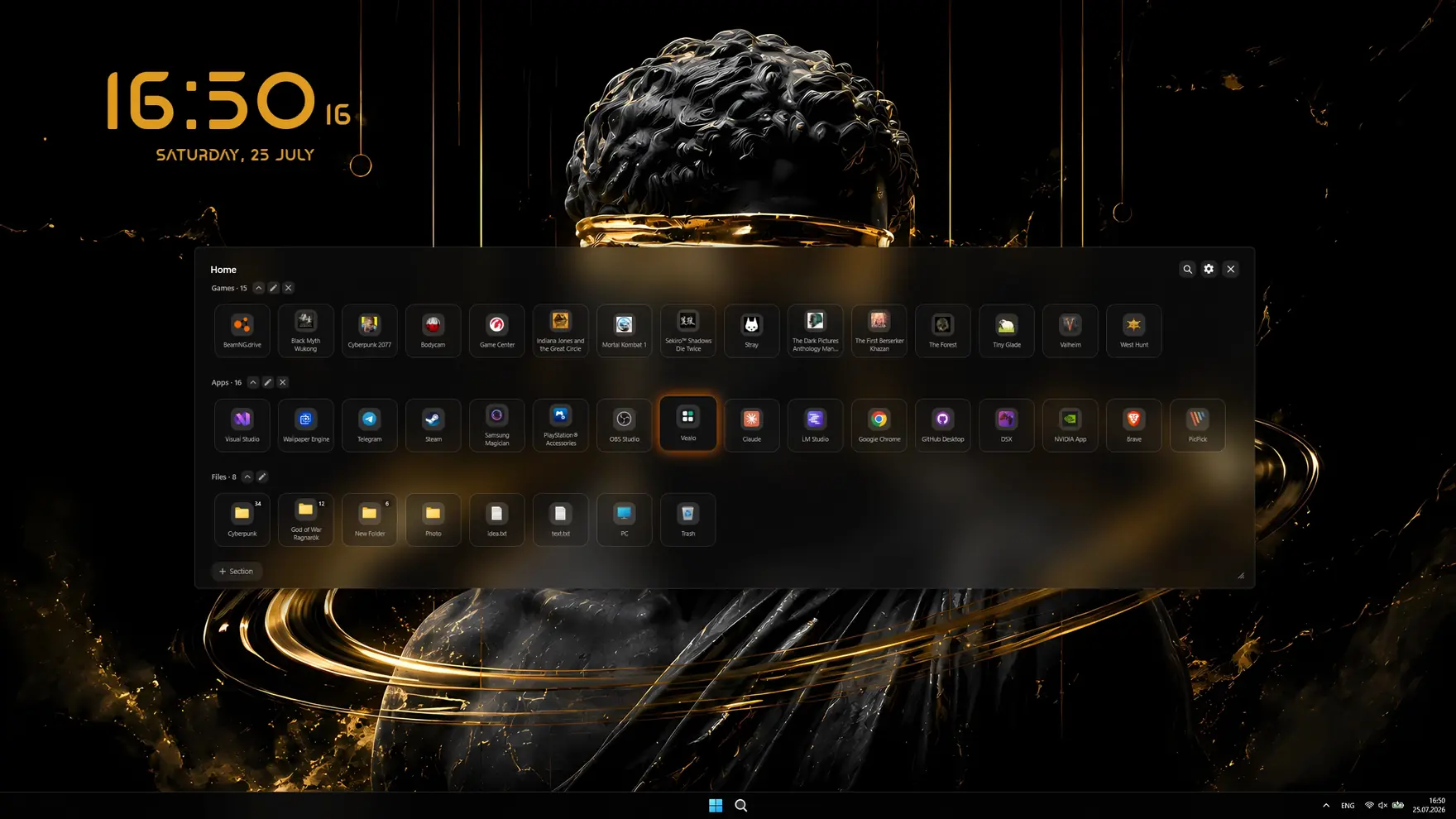
The clean desktop and the panel
One button sweeps every icon off the desktop. Nothing is moved or deleted: Vealo uses the standard Windows setting, and turning the feature off brings the normal desktop back instantly.
- Summon by hotkey (Ctrl+Shift+F by default, fully reassignable) or by clicking an empty spot on the desktop.
- Your own sections, for example Games, Apps and Files, with drag ordering and group drag and drop.
- Instant search across the whole folder tree, a clickable breadcrumb path and a built-in image viewer.
- Tile sizes S, M and L, a separate slider for label text size, interface scale from 50% to 150%, and a panel you can resize by any edge or corner.
- Fast startup: the desktop is marked icon-free before Explorer builds it, so icons never flash at logon.
- Optional power button with shutdown, restart, sleep and lock, plus a sleep timer.
Quick actions worth knowing
The panel works like a fast file manager. These are the moves that are easy to miss.
- Drag a file or folder from any Explorer window into the panel and it is copied there. Big folders copy in the background: Windows shows its own progress window with a cancel button while the panel stays responsive.
- Drag an icon out of a folder onto Home or onto any step of the path at the top, and the file moves there.
- Select several tiles with Shift+click, or drag a selection box over an empty area. Dragging any selected tile moves the whole selection at once.
- Right-click a tile for Copy or Cut, then right-click an empty spot in the target folder and Paste.
- Search at the top looks through every nested folder at once, not just the open one.
- Right-click, Hide removes an icon from view without touching the file. Delete removes only the shortcut from the desktop folder, the app itself stays installed.
- Drag tiles into a group or between groups, the order is remembered.
- Widgets are dragged with the mouse right on the desktop, and Shift plus the right mouse button moves them at any moment, even with the panel closed.
- The panel resizes by any edge or corner, and each monitor remembers its own size and position.
- Click a picture to open it in the built-in viewer and flip through the folder with arrow keys.
Two monitors, two desktops
Vealo treats every screen as its own space instead of stretching one layout across all of them.
- A separate set of shortcuts per screen: arrange icons across monitors and each panel shows only that screen's icons.
- A separate panel size and position per screen, remembered where you left it.
- The panel opens on the monitor your cursor is on.
- Mixed display scaling is handled correctly, for example a 125% laptop screen next to a 100% monitor.
Themes, glass and the taskbar
Colour is not limited to the panel. Vealo pushes the same look onto Windows itself.
- A set of ready colour themes, all free, plus a theme generated from your wallpaper's colours and a fully custom colour with an on-screen eyedropper.
- Two window styles: Mono, an opaque surface, and Glass, the real Windows 11 acrylic blur with adjustable transparency.
- Windows light or dark mode and a dark or light taskbar follow the panel; with Pro the taskbar takes your theme colour.
- Six opening animations, outline modes, a window frame button and a neon strength slider.
Wallpapers and video wallpapers
A built-in gallery plus your own files, rendered for each monitor at its native resolution.
- Categories: abstract, anime, city, cozy, dark, light, nature, cosmos, and your own favourites.
- Crop control and a contrast slider, so a picture fits any aspect ratio without stretching.
- The same picture can go to the lock screen.
- Video wallpapers play underneath the desktop icons, a different video per monitor, with speed control.
- The built-in viewer plays videos too: open a clip from any folder, scrub the timeline, pause, set the volume, and make it your wallpaper in one click.
- Upscaler (Pro): when a picture you add is smaller than your screen, Vealo offers to enlarge it with a neural network up to your monitor's resolution, with separate modes for photos and drawings. Seconds on a modern GPU.
- Filters: Glass and B&W glass with strength and grain sliders, set per monitor. The filter is baked into the picture, so it costs nothing while the desktop runs.
- Mirror: flip the wallpaper per monitor, optionally together with the widgets. Works for video too.
Cursors, including your own files and packs
The mouse pointer is part of the look, so Vealo restyles it too, and it can take cursors you bring yourself.
- Nine built-in shapes, from the classic arrow to a 3D pixel cursor. The arrow and comet are free.
- 20 ready-made cursor packs: Crystal, Gold, Forest, Fire, Caramel, Gothic, Ice, Pixel, Chrome, Neon, Hologram, Synthwave, Cosmos, Astral, Amethyst, Ruby, Lava, Toxic, Porcelain and Steampunk, with animated busy cursors. Cursor size goes up to 2.5 times the standard.
- Fill colour, outline colour, automatic outline, black or white outline, and a mode that recolours the cursor together with the theme.
- Add your own .cur and .ani files and they appear next to the built-in shapes.
- Add a whole cursor pack: point Vealo at a folder of .cur and .ani files and it becomes a selectable set. One click restores the standard Windows cursor.


Effects, parallax and sound
The living layer of the desktop: particles, depth and background sound, all drawn under the icons rather than in a window.
Effects
- Rain, snow, leaves, sparks and lightning.
- Per-effect controls: colour, density, scale, speed, opacity and wind.
- Game mode pauses effects and video wallpapers as soon as something goes fullscreen, freeing GPU memory.
- Everything runs in a separate process, so the panel stays responsive.
Parallax
- Parallax: the wallpaper gains depth and follows the cursor, with strength and smoothness sliders.
Glitch and VHS
- Glitch: thin strips of the wallpaper tear sideways, and now and then a shift line runs down the screen. Three levels (rare, medium, often) and a strength slider.
- VHS: flickering grain, colour fringing on edges, fine line jitter and a soft picture, like an old tape. With desktop icons visible only the grain stays, so the icons remain readable.
- Both work on top of video wallpapers too, and so does parallax. On video, VHS draws the grain and the line jitter.
- Per monitor: with two or more screens, particles, parallax, glitch and VHS are set for each screen separately. Glitch and VHS run at 30 or 60 frames per second, your choice.
Ambient sound
Background loops for work or sleep, mixed inside the app.
- Rain, fire, storm, thunder, forest, lake and ocean, and several of them can play at once.
- Seamless looping with smooth fades, plus your own audio files.
- Sleep timer from 15 minutes to 12 hours, optionally shutting the computer down at the end.
- A sound visualizer on the wallpaper: bar, wave or ring, several palettes, reacting to whatever the computer is playing.
- Radio in five styles: Lo-fi, Ambient, Piano, Classical and Jazz. Stations come from a public catalogue, one button switches to the next.
Desktop widgets
Six widgets live on the wallpaper, not inside the panel. Here is what they share, and what each one can do.
Shared customization
- Five materials for every widget except the clock: soft, torn, glitch, pixel and wire. The clock has its own compositions instead. View and style are chosen per widget.
- Colour follows the theme or goes fully custom with an on-screen picker; most widgets also take a solid background of any colour and an outline button.
- Each widget has its own size slider.
- Moving is the same everywhere: drag with the mouse while the Widgets tab is open, Shift plus right mouse button at any moment, or drag the widget on the Studio mini-scene.
- The Roulette redresses enabled widgets with one shared material per roll.
Clock
- Several layouts and a large font selection, with scale up to 300%.
- Colour, opacity, shadow, seconds, AM/PM and its own label language.
Media player
- Shows whatever is playing in any app, and the buttons work right on the desktop.
- An always-on-desktop mode and a compact line view.
Calendar
- Five views: line, day, week, month and year, with today highlighted.
- Its own language: month names, day names and the first day of the week come from the culture you pick.
Weather
- Five views, your city is detected automatically, with a forecast and feels-like temperature.
- Hand-drawn weather icons that match the widget style.
System monitor
- Up to ten readings: FPS, ping, CPU, GPU, GPU temperature, video memory, RAM, disk, network and battery, in five layouts. The widget can sit on top of games or show only while you play.
Notes
- Five views: sticker, checklist, line, focus and progress.
- Checkboxes work right on the desktop; in the line and focus views a click completes the task and shows the next one.
- Double-click the widget to open the list editor in the panel.
Keyboard and device lighting
The theme continues past the screen onto your peripherals.
- Razer Chroma works straight away; thousands of other devices connect through the free OpenRGB.
- Twelve effects: static, breathing, wave, checkerboard, fire, reactive, ripple, starfall, rain, glow, spectrum and Screen, where the keyboard repeats the colours of what is on the monitor.
- Brightness, brightness contrast, colour contrast, and a mode that reacts to what is on screen.
- The DualSense controller light bar joins the lighting too.
The Roulette
A separate tab that rolls a whole new look in one click: wallpaper, theme, effects, widgets, cursor and lighting at once.
- Only what you mark gets rolled. A widget you turned off will not appear, one you use will not disappear.
- Filters for everything: wallpaper categories, theme style, kinds of effects and widgets.
- It looks at the picture: all widgets get one matching material per roll, and busy wallpapers never get the hardest-to-read style.
- One click reverts a roll you dislike, and a look you love saves straight into a profile.
Profiles
A profile is the whole look saved at once, not just a colour.
- Theme, wallpaper, window style, cursor, effects, sound, lighting and widgets, all in one slot.
- Switching a profile applies everything in one click, for example Work, Gaming and Evening.
- Two slots are free, more come with Pro.
Steam Workshop: ready-made setups
A setup is a whole desktop in one file: theme, wallpaper or live wallpaper, widgets, effects and lighting. The Workshop lives inside the app and is free for everyone.
- Browse by mood, colour, resolution, aspect ratio, type, age and contents, with a preview of the real desktop and the like count on every card.
- Subscribe right in the card with a download bar, then Apply the whole setup or take only the wallpaper. Undo returns your previous look.
- Likes, dislikes and favourites are set from the card and count in Steam immediately.
- Publish your own look: pick a mood and age, everything else (resolution, colour, widgets, paid parts) is tagged automatically. Your own picture is packed into the file, paths and user names never leave your PC.
- Setups are also plain files: save one and send it to a friend without Steam, open a file you received.
What is free and what is Pro
The desktop organizer itself is free forever. Pro is a one-time purchase that unlocks the rest of the customization.
Frequently asked questions
Can I use my own cursors in Vealo?
Yes. Vealo accepts your own .cur and .ani files and whole cursor packs: point it at a folder of cursor files and the pack becomes a selectable set. It also ships nine built-in shapes and 20 ready-made packs. Your own cursors and the packs are part of Vealo Pro.
Does Vealo delete or move my desktop icons?
No. It uses the standard Windows setting that hides desktop icons, and shows the same shortcuts inside its panel. Nothing is moved on disk, and switching the feature off restores the desktop instantly.
Does it work with two monitors?
Yes, and each screen is treated separately. Every monitor keeps its own panel size and position, the panel opens on the screen your cursor is on, and each screen can show only the shortcuts that live on it. Different display scaling on different monitors is handled correctly.
Does Vealo need an internet connection or an account?
No. The app is fully offline: no account, no telemetry, no network connections, no admin rights. Settings and an icon cache are stored locally in %AppData%\Vealo and can be deleted at any time.
Why is the Glass style not turning on?
Three usual reasons: Windows energy saver is on, transparency effects are switched off in Windows, or the Windows build is older than 22H2. Vealo names the reason next to the style and links straight to the right settings page.
What exactly does Vealo Pro add?
The theme generated from your wallpaper and custom colours, the taskbar in your theme colour, all cursor shapes, 20 cursor packs and your own cursors, all desktop effects including parallax, glitch and VHS, all ambient sounds plus your own audio files and the sound visualizer, all widget styles, fonts and views, all lighting effects including Screen, the upscaler, unlimited sections and profiles, and the glass transparency and neon sliders. It is a one-time purchase, not a subscription.
A clean desktop in one click
Try it on your own machine before you buy anything.
Free€0 · Forever
- Hide, summon and search
- All ready-made themes, Mono and Glass
- Taskbar colour, light and dark system
- All 128 wallpapers and video wallpapers
- 6 widgets: clock, player, calendar, weather, system, notes
- Rain effect, 2 cursors and the Roulette
- Lighting: static and breathing
- 2 sections and 2 profiles
Pro€2.99 · Launch price
- Everything in Free
- Theme from your wallpaper and custom colours
- All effects, parallax and the sound visualizer
- All cursors plus your own, all widget styles
- All lighting effects
- Glass transparency and neon
- Unlimited sections and profiles
- Wallpaper on the lock screen