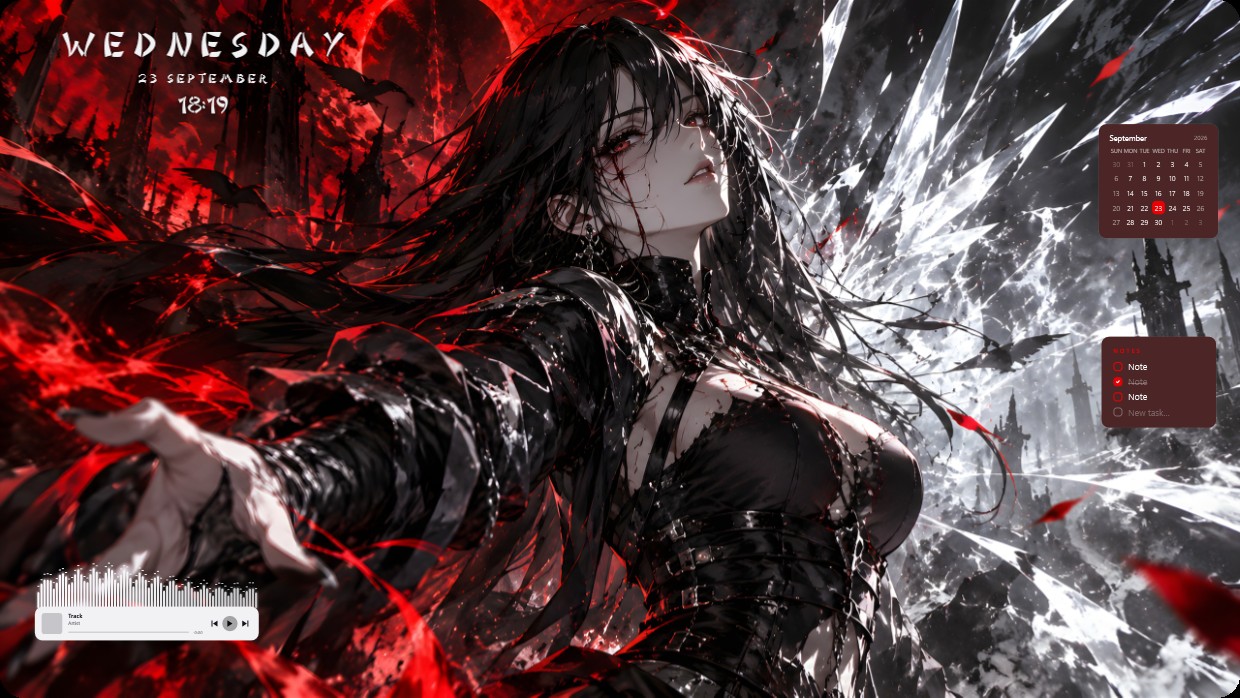
Red and White Anime
 par Vealo
3
3
0
par Vealo
3
3
0
Tu ne trouves pas ce setup dans Vealo ou Steam ? Steam masque les 18+ tant que le contenu pour adultes n'est pas autorisé dans les paramètres. Ouvrir les paramètres Steam
Contenu
The wallpaper shows a female character with long black hair and red eyes extending her hand against a backdrop of red skies, dark ruins, and flying bats. The main colors are red, black, and white, creating a high contrast scene that feels cold and dramatic. Widgets include a clock in the top left, a calendar and notes panel on the right, and a player bar at the bottom. All widgets use light-colored text with semi-transparent backgrounds to blend into the image. This 2K setup includes lighting effects. Fans of dark fantasy themes will like it.
Comment installer ce setup
- Installe Vealo depuis Steam. La version gratuite suffit.
- Clique sur « S'abonner dans Steam » sur cette page, ou retrouve le setup dans l'onglet « Workshop » de Vealo.
- Ouvre Vealo, va dans le Studio, onglet « Workshop », « Mes setups », puis clique sur « Appliquer ». Fond d'écran, thème, widgets, curseur et éclairage changent en un clic. La taille de tes icônes reste celle que tu as choisie.
Setups similaires
Tous les setups
Un bureau net en un clic
Essayez-la sur votre machine avant tout achat.
Windows 10 / 11