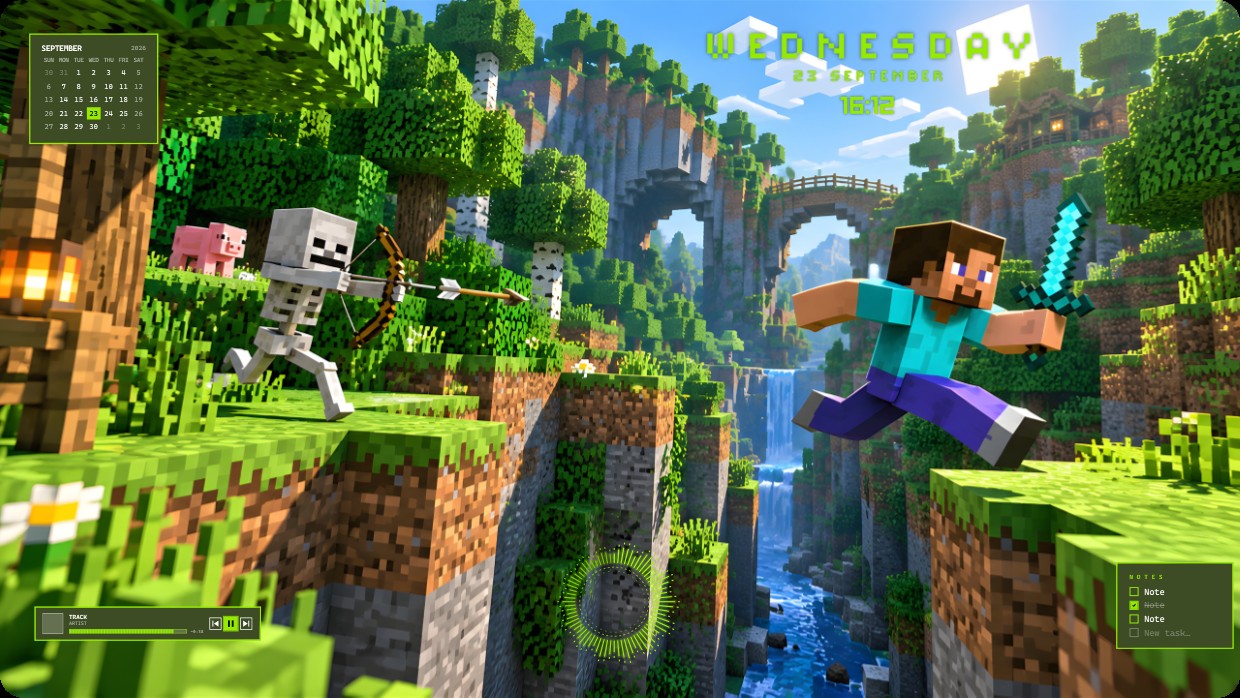
Minecraft Steve
 de Vealo
¿No encuentras este setup en Vealo o Steam? Steam oculta los 18+ hasta que permites el contenido para adultos en los ajustes. Abrir ajustes de Steam
Qué contiene
The wallpaper shows a Minecraft scene with Steve leaping across a canyon while a skeleton aims an arrow nearby. The main colours are bright green, blue sky, and earthy browns under warm sunlight. The mood is adventurous and lively. Widgets include a calendar in the top left, time and day at the top right, a player bar at bottom left, and notes at bottom right. All widgets use small white or light green text on semi-transparent dark panels. This setup uses 2K resolution and includes lighting effects. Minecraft fans will like it.
Cómo instalar este setup
- Instala Vealo desde Steam. Con la versión gratuita basta.
- Pulsa «Suscribirse en Steam» en esta página o busca el setup en la pestaña «Workshop» dentro de Vealo.
- Abre Vealo, entra en el Estudio, pestaña «Workshop», «Mis setups», y pulsa «Aplicar». Fondo, tema, widgets, cursor e iluminación cambian en un clic. El tamaño de tus iconos se queda como lo tenías.
Setups parecidos
Todos los setups



Tu escritorio en un clic
Gratis en Steam. Pon un setup o crea el tuyo, Pro solo cuando quieras el resto.
Windows 10 / 11